log
Rows 1
 Hookshot Recomp
Match the on-screen line or the log line to the current readme. If the game opens and closes, or the log says device lost, the readme says to update the graphics driver. common-issues.md is an older note, mostly about v2.0.14, and its GitHub issue links do not resolve.
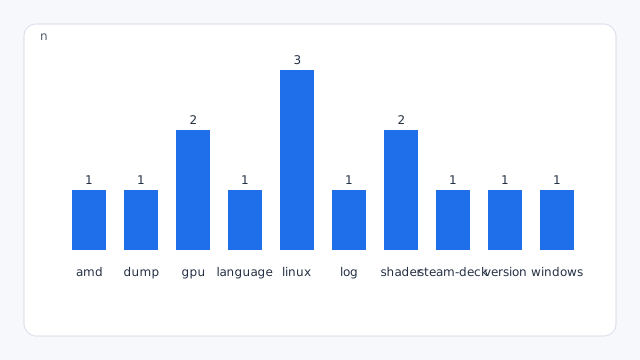
| Symptom | What to do | Area |
|---|---|---|
| Where is the log? | hookshot_log.txt in the game folder holds the last run. The four runs before are hookshot_log.1.txt (the last) to .4.txt. Started from a terminal, the game prints there instead. Every 600 frames it has a vk: status: line: the video memory in use of what the driver allows, and DLSS's details while it draws; vk: over the driver's video-memory allowance says when the game passed it The logs are safe to send as they are: your home folder is written ~ (%USERPROFILE% on Windows) and your user name <user> in their paths, the rest of each path kept; the builder's --log file is written the same way | log |
| A place has a wrong texture, or a floor or wall is missing | Look for hookshot_damaged_files.txt in the game folder. The build writes it when your game dump is incomplete (about 23.3 GB, a complete one is about 23.8 GB): it lists each damaged game file and the file put in its place. Dump the game again and build from the new dump; the file is then removed | dump |
| Linux Builder Play closed before the game log appeared | After the game exits, check hookshot_startup.log in the game folder for up to 64 KiB of startup stderr and its exit status. | linux |
| "Hookshot supports build e0f3ccfa" or "This version isn't supported" | Check that you chose the right game with its update installed | version |
| The game opens and closes, or the log says "device lost" | Update your graphics driver. On AMD cards there are known crashes (#708, #614) | gpu |
| Parts of the picture are missing, or a message says your card has no mesh shader support | The card or its driver has no mesh shaders. Update the driver; older cards are not supported (#640) | gpu |
| AMD: blocky textures, solid rectangles in the sky or unusually dark courtyard surfaces | Try the RGBA8 texture workaround. It uses more graphics memory | amd |
| Linux, AMD: grass and small plants flicker in and out, and the log says not imported (VkResult -13) and storage buffer NOT bound | The kernel's udmabuf limit (64 MB) is smaller than some of the game's memory pools. Builds with the sparse-queue fix import those through the driver's sparse queue. On older builds, or if the log still says CANNOT be imported, close the game and run echo 2048 | sudo tee /sys/module/udmabuf/parameters/size_limit_mb, then start it again. The setting lasts until a restart of the PC; a line w /sys/module/udmabuf/parameters/size_limit_mb - - - - 2048 in /etc/tmpfiles.d/udmabuf.conf sets it at every start | linux |
| Linux: the game does not start or the picture is broken | The game needs a Vulkan 1.3 driver with mesh shaders. Check with vulkaninfo | grep mesh: it should list VK_EXT_mesh_shader. Update Mesa or the NVIDIA driver | linux |
| Steam Deck: the game freezes and closes in Kokiri Forest or the Great Deku Tree (gfx_0.0.0 timeout in journalctl -k) | RX_VK_MESH_NOCULL=2c56dc1006942f74 in hookshot_env.txt gets past it with every model drawn (the culling pass that runs for seconds is turned off). RX_VK_SKIP_CODE=2c56dc1006942f74 also gets past it, but the models those draws make go missing (see the development guide, #817) | steam-deck |
| "Your antivirus removed part of the build tools" | A false alarm on unsigned programs. Restore the files from Windows Security's Protection history, or add %LOCALAPPDATA%\HookshotBuilder to its exclusions, then press Repair | windows |
| Stutter the first time you see something | Normal for now: shaders are being prepared. It gets better when you pass through the same place again. You can help remove it for everyone: send your pipeline list | shader |
| Windows, NVIDIA: stutter every start in places you have seen, after the shaders were prepared | The driver's shader cache is too small to keep them all (the first start builds about 2 GB of pipelines into it). In the NVIDIA Control Panel, Manage 3D settings, set Shader Cache Size to Unlimited (or 10 GB). On Linux the game raises the driver's limit itself | shader |
| The game is in the wrong language | Change the code in language.txt in the game folder. The file lists them all, and an update keeps the one you set there | language |
hookshot_log.txt in the game folder is the last run. The four runs before it are hookshot_log.1.txt through hookshot_log.4.txt. A terminal launch prints there instead. Every 600 frames the log can include a vk status line for video memory. Linux Builder Play that closes before that log exists leaves hookshot_startup.log, up to 64 KiB of startup stderr.
A message that Hookshot supports build e0f3ccfa, or that this version is not supported, means the selected game update is wrong. Dump program 0400486024DEC000 at update v131072 again. Missing textures with hookshot_damaged_files.txt mean the dump is incomplete.
Missing parts of the picture, or a message that the card has no mesh shader support, means the driver or the card cannot do mesh shaders. Update the driver. Older cards stay unsupported. On Linux, vulkaninfo should list VK_EXT_mesh_shader. AMD blocky textures can try the RGBA8 workaround, which uses more graphics memory. First-time stutter is shader preparation and eases after you pass the same place again. On Windows with NVIDIA, a small shader cache drops pipelines that were already built. The NVIDIA control panel path is Manage 3D settings, Shader Cache Size, Unlimited or 10 GB. Linux raises the driver limit itself.